Hello, tech-savvy gardeners! 🌿🤖 Ever found yourself in need of your Roboticmower A1's serial number (SN) for registration, warranty checks, or troubleshooting? Look no further! We're about to unveil three simple methods to locate that elusive SN and keep your lawn care journey seamless.
Method 1: A Peek Behind the Scenes
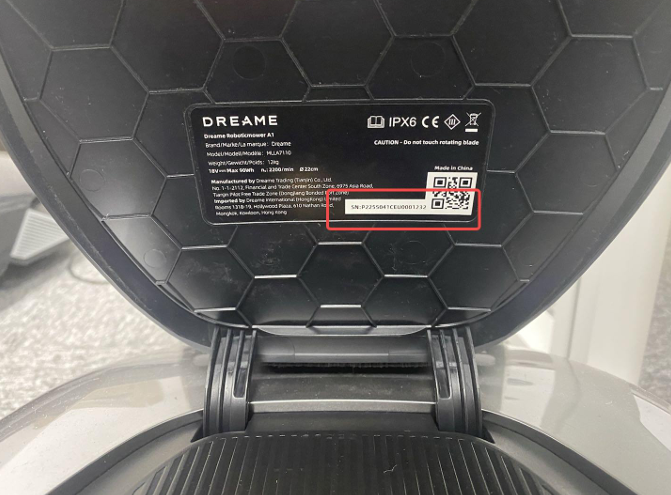
The first method is as simple as checking the backside of the cover of your Roboticmower A1's control panel. Here's how:
- Flip the Cover: Turn over the protective cover of the control panel to reveal the hidden details.
- Find the SN: There it is, your unique serial number, waiting to be used for all official purposes.
This method is a handy go-to when you need a quick lookup without diving into the device's settings.
Method 2: A Deeper Dive into Settings
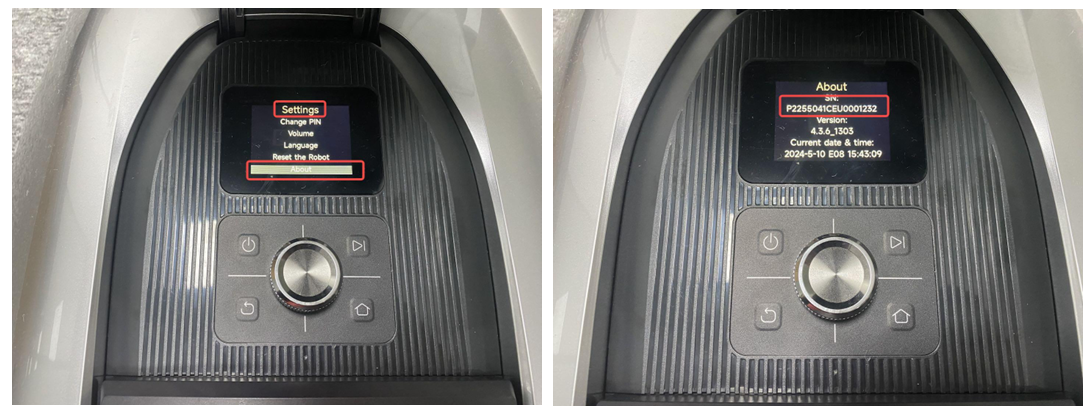
For those who prefer a digital approach, navigating through the control panel settings can also lead you to the SN. Follow these steps:
- Access the Control Panel: Power on your Roboticmower A1 and access its control panel.
- Navigate to Settings: Look for the "Settings" menu, a gateway to various configurations.
- About the Device: Within settings, find the "About" section, holding key information about your device.
- Discover the SN: Here, you'll uncover the serial number, a unique identifier for your Roboticmower A1.
Method 3: Robot Info Reveal
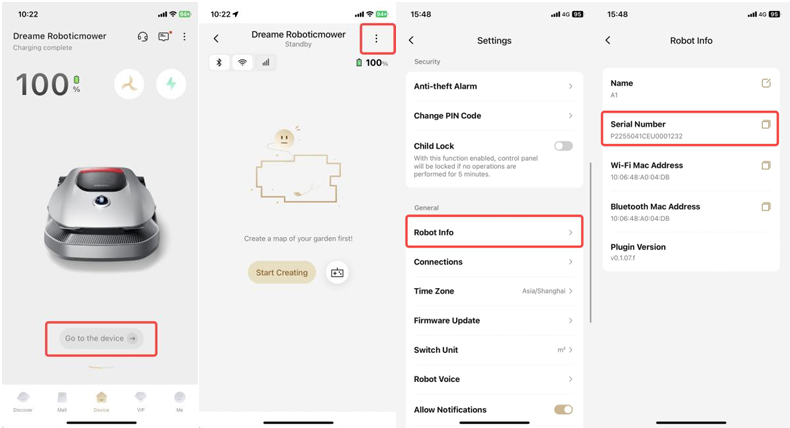
Sometimes, the information you seek is tucked away in plain sight. To find the SN using this method:
- Settings Shortcut: From the main interface, head straight to "Settings."
- Robot Info: Look for an option that says "Robot info" or "Robot details."
- Serial Number: Within this section, you'll find the serial number, your key to personalized support and services.
Why Knowing the SN Matters
Knowing the serial number of your Roboticmower A1 is not just about keeping records. It's also crucial for:
- Warranty Services: Validating your warranty coverage and processing claims.
- Registration: Registering your device for official records and personalized services.
- Technical Support: Assisting technicians in diagnosing and resolving issues swiftly.
Conclusion
Whether you're a visual learner who prefers a physical inspection or a tech enthusiast who likes to dive into menus, finding the SN of your Roboticmower A1 is now a breeze. With these three methods, you're always prepared with the information you need to keep your lawn looking its best.
So, go ahead, explore, and keep your Roboticmower A1 in tip-top shape with the right information at your fingertips. Happy gardening! 🌟

Comments
0 comments
Please sign in to leave a comment.