Hello there, cleaning crew commander! 🧹 Is your trusty robot vacuum acting like it has a bumpy memory, constantly complaining about running into walls when it's not? Let's get its bump sensor back on track with these simple steps!
🧐 Bump Sensor Troubleshooting Guide
Step 1: Give the Sensor a Little Love Tap
- A Gentle Slap: Try to gently slap the collision board (that's the part with the sensor) to make sure it's in a state where it can rebound. It's like waking it up from a deep sleep!
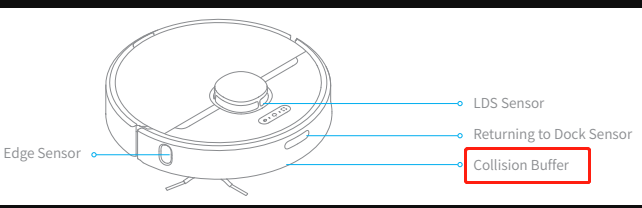
Step 2: Restart and Reset
- Power Cycle: Sometimes, all it needs is a quick reboot. Turn off your robot, wait for a few seconds, and then turn it back on. It's like hitting the refresh button!
Step 3: Test It Out
- Let It Roam: After the restart, let your robot vacuum roam around a bit to see if the bump sensor is now behaving. Watch it closely to ensure it's not falsely reporting collisions.
🤝 If Love Taps and Restarts Don't Work
- Reach Out: If your robot is still not getting along with your walls and furniture, it might be time to contact customer service. They're the pros at getting your robot back to its friendly, collision-free self.
💡 Tips for Preventive Maintenance
- Regular Checks: Give your robot's bump sensors a gentle check every now and then to make sure they're clean and functioning well.
- Smooth Surfaces: Make sure there are no obstructions or loose items in the robot's path that might be causing false readings.
Final Thoughts
With these steps, your robot vacuum's bump sensor should be back to normal, and it can go about its cleaning duties without any unnecessary drama. Remember, a well-adjusted robot is a happy robot! If you need further assistance, we're just a call or click away. Happy cleaning! 🧹💪

Comments
0 comments
Please sign in to leave a comment.