Hey there! Ready to make your robot's cleaning skills even more efficient? Let's dive into how to use the Spot Clean function in a breeze!
Step 1: Power Up Your Robot First things first, make sure your trusty robot is either paused or chilling in Standby Mode. It's like giving it a quick break before it tackles a specific spot.
Step 2: Spot Clean, Here We Go! Now, find that Spot Clean button on your robot. It's the magic button that tells your robot to focus on a particular area. Press and hold it for a good 3 seconds, and voilà! Your robot is now in Spot Clean Mode.
Step 3: Watch It Work Its Magic In this mode, your robot will whip out its cleaning prowess on a 1.5×1.5 meter square area right around it. It's like a targeted cleaning mission!
Step 4: Automatic Return and Power Down Once your robot has polished that spot to perfection, it will smartly navigate back to where it started and then take a well-deserved power nap.
Important Note: Just a heads-up! When you switch to Spot Clean Mode, your robot will politely finish up whatever it was doing before and then focus solely on the spot you've chosen.
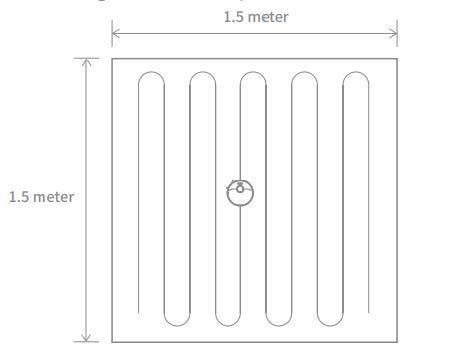
And there you have it! Spot cleaning made simple and user-friendly. Your robot is now ready to tackle those stubborn spots with ease. Happy cleaning!

Comments
0 comments
Please sign in to leave a comment.