Hello, vacuum virtuoso! Keeping your H11Max or H11 vacuum's roller brush cover clean is essential for maintaining peak performance. Let's walk through the simple steps to clean this vital component, ensuring your vacuum continues to deliver its best.
Step-by-Step Guide to Cleaning the Roller Brush Cover
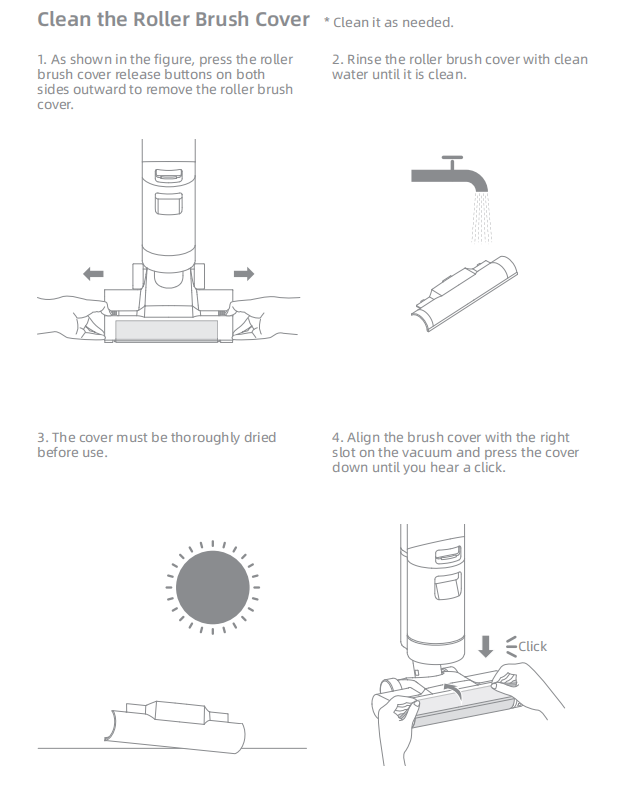
1. Removing the Roller Brush Cover:
- Locate Buttons: Find the roller brush cover release buttons on both sides of the vacuum.
- Press Outward: Gently press these buttons outward to release the roller brush cover.
2. Cleaning the Cover:
- Rinse Thoroughly: Rinse the roller brush cover with clean water until all debris and hair are removed.
- Ensure Cleanliness: Make sure the cover is completely free of dirt and hair before proceeding.
3. Drying the Cover:
- Thorough Drying: Allow the roller brush cover to air dry completely. It's crucial that the cover is thoroughly dry before reinstallation to prevent any moisture-related issues.
4. Reinstalling the Cover:
- Align Cover: Position the brush cover over the designated slot on the vacuum.
- Secure Cover: Press the cover down firmly until you hear a click, indicating it's securely in place.
Tips for Maintaining Your Vacuum:
- Regular Cleaning: Regularly clean the roller brush cover to prevent blockages and maintain suction power.
- Check for Obstructions: Periodically inspect the brush for any tangled hair or debris that could affect performance.
- Use the Right Tools: Use the appropriate tools and accessories recommended for your vacuum model to ensure optimal cleaning results.
By following these steps, you can keep your H11Max or H11 vacuum running smoothly and efficiently. A clean roller brush cover is key to a clean home. If you have any questions or need further assistance, feel free to reach out. Happy cleaning!

Comments
0 comments
Please sign in to leave a comment.