Hello, smart home enthusiast! 🏡➡️🗣️ Ready to connect your Dreame Home devices to Alexa and control them with your voice? Let's get your devices chatting with Alexa in a few easy steps!
📋 Prerequisites Before We Begin
- Dreame Home App: Make sure you have the latest version of the Dreame Home App downloaded on your smartphone.
- Account Ready: Ensure you've created an account and logged in successfully to the Dreame Home App.
- Device Online: Confirm that you have a networked device added to your Dreame Home App account and that it's online.
- Alexa App: Download the latest version of the Alexa App on your device.
- Alexa Logged In: Make sure you're logged into the Alexa App successfully.
🛠️ Step-by-Step Binding Process
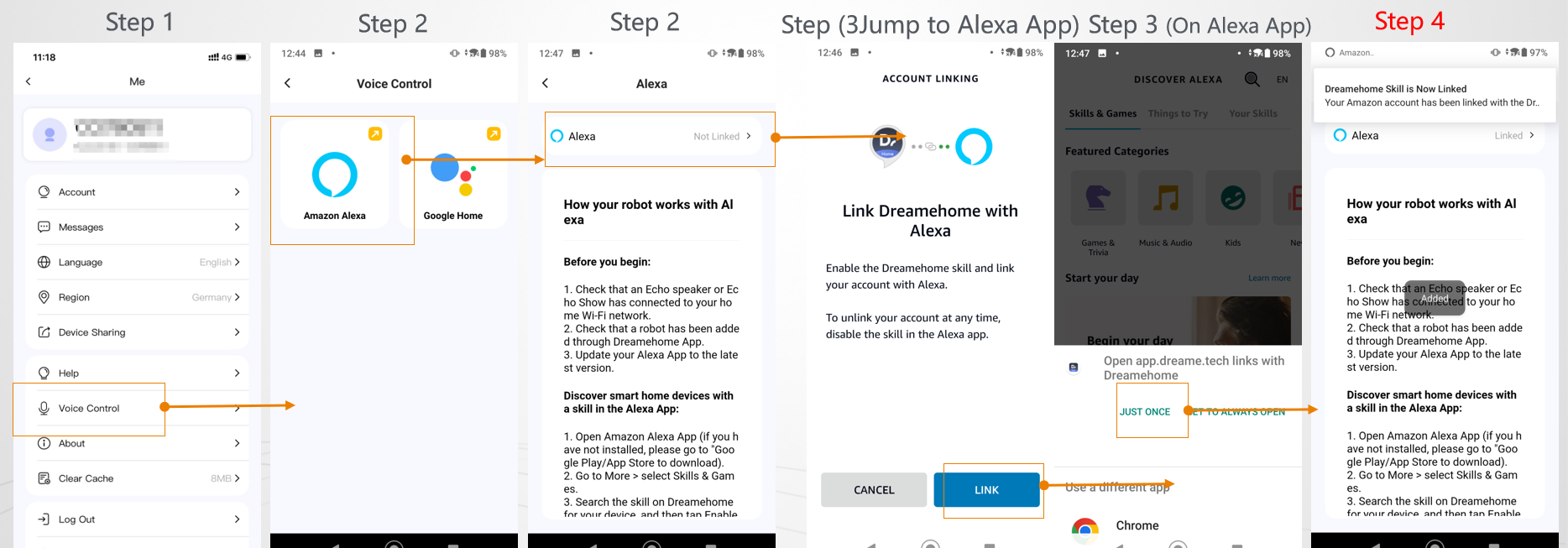
Step 1: Open Dreame Home App
- Go to "Me": Launch the Dreame Home App, head to the "Me" section, and choose "Voice Control."
Step 2: Select Amazon Alexa
- Enter Alexa Page: Tap on "Amazon Alexa" to land on the page where you can link your accounts.
Step 3: Initiate Binding
- Click to Bind: Tap on Alexa to start the binding process.
- Sign In to Amazon: You'll be redirected to the Amazon Alexa web version login page. Enter your account password and click "sign in."
- Authorize Dreame Home: A pop-up will appear, asking for permission. Click "Dreame Home" to authorize and automatically return to the Dreame Home App. (Make sure to select "Dreame Home" to complete the binding.)
Step 4: Wait for the Magic
- Check Binding Result: Give it about 5 seconds. The Dreame Home App will notify you of the binding result.
- Linked Status: If successful, you'll see the Alexa status change to "Linked." 🎉
- Retry if Needed: If it doesn't work, no worries! Just repeat the steps above.
💡 Tips for a Smooth Setup
- Double-Check: Make sure both your Dreame Home and Alexa apps are up to date.
- Stay Connected: Ensure your device is online and connected to the internet during the setup.
- Be Patient: Sometimes, it might take a little longer to link. Patience is key!
Final Thoughts
With these steps, your Dreame Home devices should be happily chatting with Alexa, ready to obey your voice commands. Remember, a well-connected home is a smart home! If you need further assistance, we're just a call or click away. Happy smart home building! 🏡🤖

Comments
0 comments
Please sign in to leave a comment.