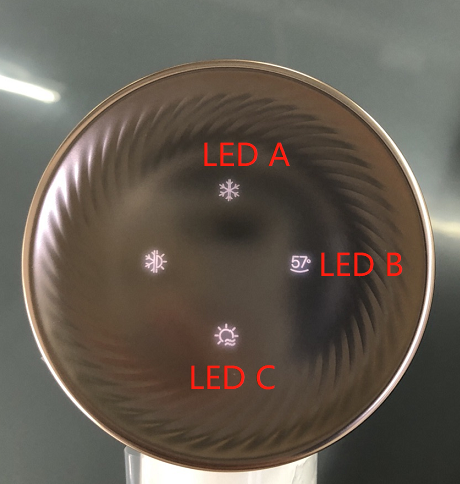
Hello there! 👋 If your device is flashing a white light error known as the BC light, don't worry—we're here to help you troubleshoot this issue step by step. (Please refer to the image below for the specific light display you're experiencing.)
Step 1: Inspect Air Outlet and Intake
- Begin by checking the air outlet and air intake for any foreign bodies that might be obstructing the airflow. Debris or dust can sometimes get caught in these areas, leading to errors.
Step 2: Clear Obstructions
- Once you've identified any blockages, carefully remove them to ensure the air can flow freely through the device.
Step 3: Restart the Device
- After clearing any obstructions, restart your machine to see if the error persists. Sometimes, a simple restart can resolve minor glitches.
Step 4: Evaluate the Situation
- If the BC light continues to flash after you've checked for obstructions and restarted the device, it's possible that there's an issue that requires professional attention.
Step 5: Contact for Repair
- If the error isn't resolved by the above steps, please discontinue use of the device and reach out to our customer service team for further assistance. We recommend sending the device back for repair to ensure it's safe and functioning properly.
And there you have it—a simple guide to help you address the BC light flash error. Remember, when it comes to errors, it's always better to be safe than sorry. If you're unsure or if the issue persists, don't hesitate to reach out to us. We're here to help!
(Note: The reference to "View the image below for light display" suggests that there should be an accompanying visual aid to help users identify the specific error light pattern. Ensure that the image is consulted for accurate diagnosis.)

Comments
0 comments
Please sign in to leave a comment.