🌟 Hello, Dreame App Enthusiasts! 🌟
Whether you're a seasoned user or just diving into the world of Dreame, we're here to make your experience as smooth and enjoyable as possible. Let's get you started with logging in, signing up, or resetting your password in no time!
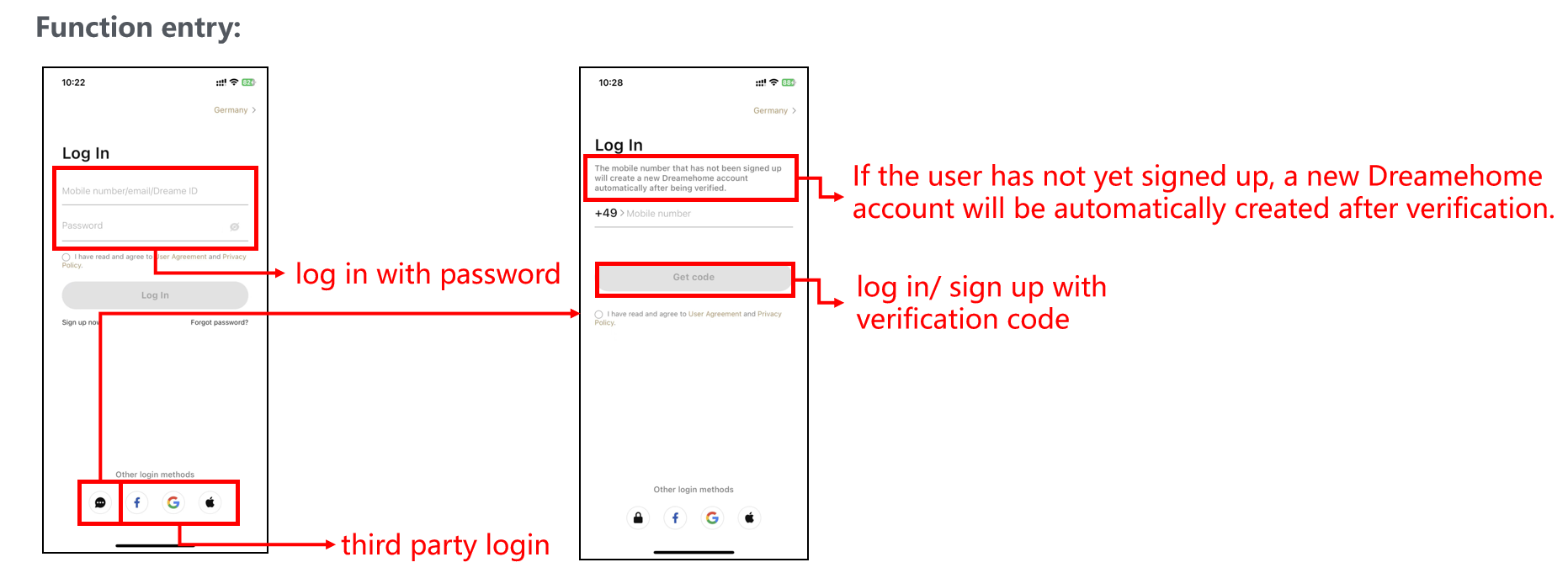
🔑 Log in to Your Dreame Account
Pick Your Login Path:
- Mobile Phone Number Login: Enter your mobile number and proceed.
- Email Login: Use your email address to access your account.
- Dreame ID Login: Log in directly with your Dreame ID.
Login Steps Made Easy:
- Pick your method from the choices above.
- Enter your details as they pop up.
- Hit that 'Log in' button and voilà—you're in!
Bonus Tip: For a seamless login, consider using a third-party service that you love.
Visual Guide:
- (Friendly Reminder: Please select the country in the top right corner of the login page that corresponds to the location of your device before logging in.)
💌 Sign Up for a Fresh Start
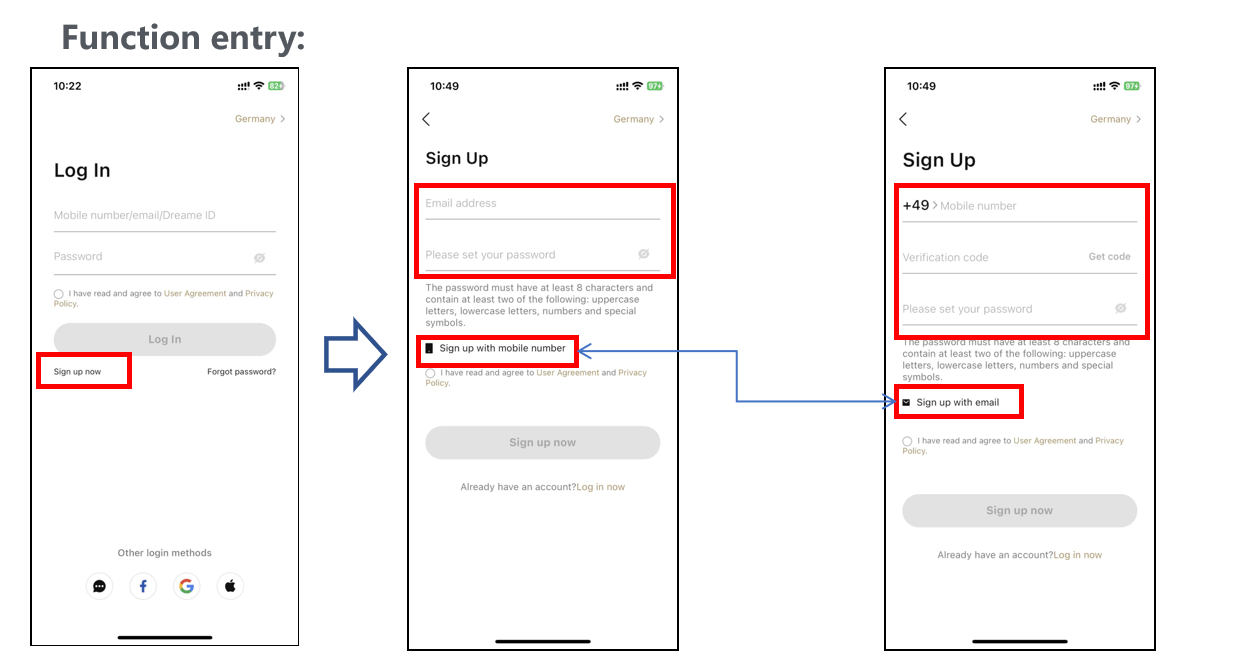
Crafting Your Account:
-
Email Avenue:
- Email Address: Your trusty email goes here.
- Set Password: Choose a password that's strong and secure.
- Confirm Password: Double-check your password to keep things tight.
-
Mobile Marvel:
- Mobile Number: Share your number with us.
- Get Verification Code: A code will wing its way to your phone.
- Set Password: Create a password for your new account.
- Confirm Password: One more time to make sure it's perfect.
Why Join the Dreame Family? Signing up opens the door to a world of personalized features and services, just for you!
Visual Guide: (And remember, set your country in the top right corner to match your device's location.)
🔄 Forgot Your Password? No Sweat!
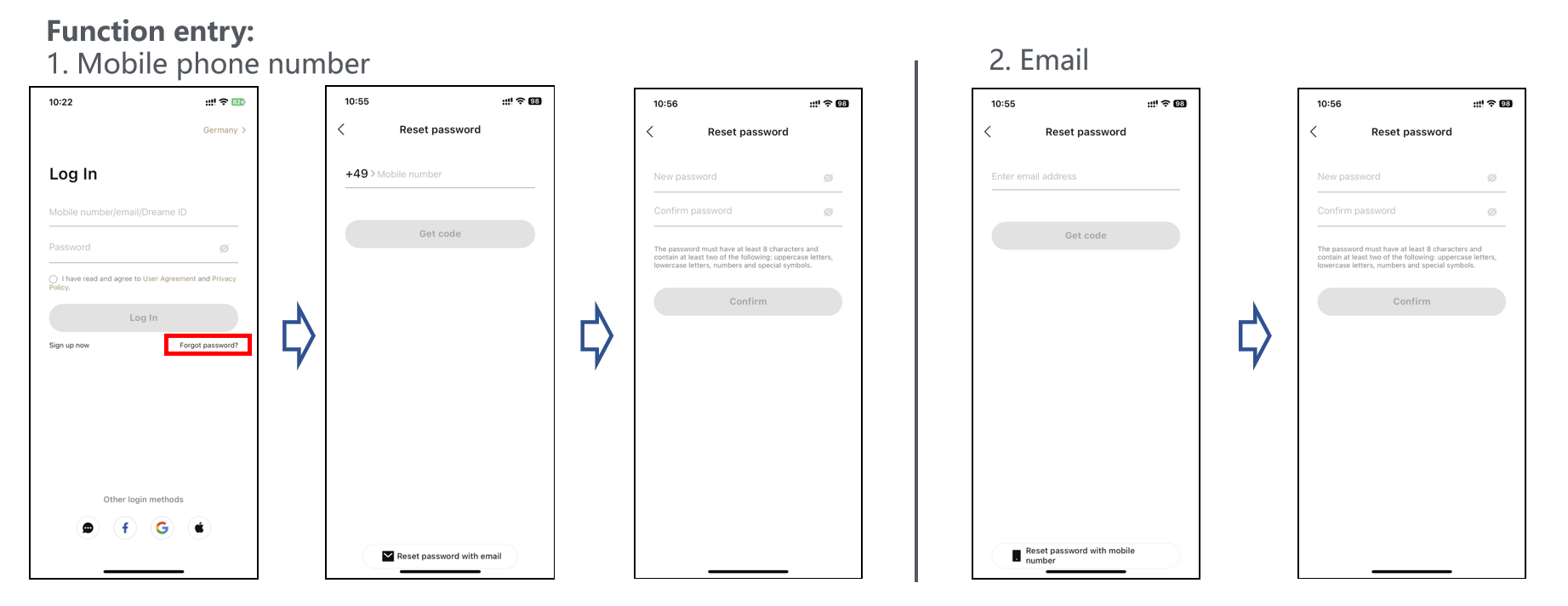
Reset Routes:
-
Mobile Number Rescue:
- Enter your mobile number.
- A reset link will text you. Just follow it to set a new password.
-
Email Revival:
- Give us your email address.
- Click 'Reset Password' and an email with instructions will be on its way.
- Follow the steps in the email to get back in the saddle.
Security Savvy: When setting a new password, make it a strong and unique one to keep your account super secure.
Visual Guide:
🤔 FAQs to the Rescue!
Q: How long does it take to receive the verification code? A: It's usually a quick sprint to your inbox, but if it's not there, check your spam folder or give it another shot.
Q: What if I don't receive the password reset email? A: Double-check that email address! If it's right, be patient and check your spam folder. If it's still MIA, reach out to our support team.
And there you have it! Whether you're logging in, signing up, or resetting your password, we're here to make your Dreame App experience as delightful as can be. Happy cleaning! 🧹🌟

Comments
0 comments
Please sign in to leave a comment.