Hello, Cleaning Enthusiasts! 👋🌟
Are you ready to dive into the world of effortless cleaning with the H14 Pro? 🧹💨 Let's get to know the buttons on your new cleaning companion that will make your chores a breeze! 🎉
1. Self-Cleaning Button 🔄 (Labeled as 1 in the image) Located right on the handle, this button is your ticket to effortless cleaning. Just press it, and your H14 Pro starts its self-cleaning routine, ensuring it's always in tip-top shape for your next cleaning adventure. 🌀
2. Mode Switch 🔄 (Labeled as 2 in the image) Right next to the Self-Cleaning Button, this Mode Switch lets you toggle between different cleaning modes. Whether you're tackling carpets or hardwood floors, a quick flip of this switch adjusts the H14 Pro to meet your cleaning needs. 🛤️↔️
3. Power Switch 🔌 (Labeled as 3 in the image) Power up your H14 Pro with this handy switch located on the handle. It's the first step to unleashing the cleaning prowess of your H14 Pro. Flip it on, and let the cleaning fun begin! 💪🔥
4. Auto Distribute Switch 💧 (Labeled as 4 in the image) This clever switch on the handle activates the intelligent distribution of your cleaning solution. It's like having a personal assistant that knows exactly how much solution to use for the best results. 🌈
5. Voice Prompt/Wi-Fi Button 🗣️🌐 (Labeled as 14 on the image, located on the back of the device) On the back of your H14 Pro, you'll find this multi-talented button. A quick press activates voice prompts or lets you adjust the volume, while a longer press initiates Wi-Fi setup or resets your network settings. Plus, you can set languages via the app! 🌐🔊
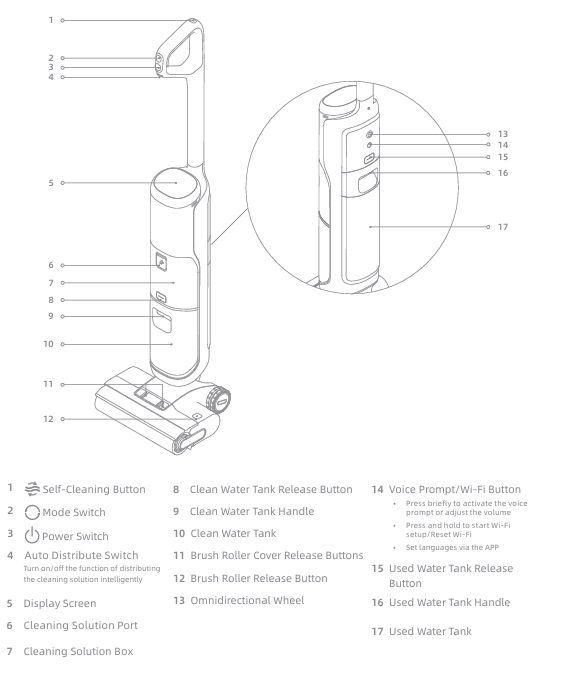
Additional Features:
- Display Screen: Keep an eye on your cleaning status and settings with the built-in display screen. 🖥️
- Cleaning Solution Port: Easy access for refilling your cleaning solution. 💦
- Clean Water Tank Release Button & Handle: Quick-release buttons and handle make it a cinch to access and empty the clean water tank. 💧
- Brush Roller Cover Release Buttons & Release Button: These buttons make maintaining your brush roller a snap. 🌀
- Omnidirection Wheel: Designed for effortless maneuverability, this wheel ensures the robot can glide smoothly under your furniture with ease, perfect for when the robot is lying flat during operation. 🔄
- Used Water Tank Release Button & Handle: No more struggling with heavy, dirty water tanks. These buttons and handle make emptying a breeze. 💧
Conclusion: 🎈
With these buttons, the H14 Pro is not just a cleaning device; it's your cleaning sidekick! 🦸♂️🧹 Whether it's switching modes, cleaning itself, or connecting to Wi-Fi, the H14 Pro has got you covered. So go ahead, give these buttons a try, and make cleaning a joyride! 🚀💨
Happy Cleaning! 🌟

Comments
0 comments
Please sign in to leave a comment.